A Schedule that Understands: Your Time Doesn't Start at the Visit.
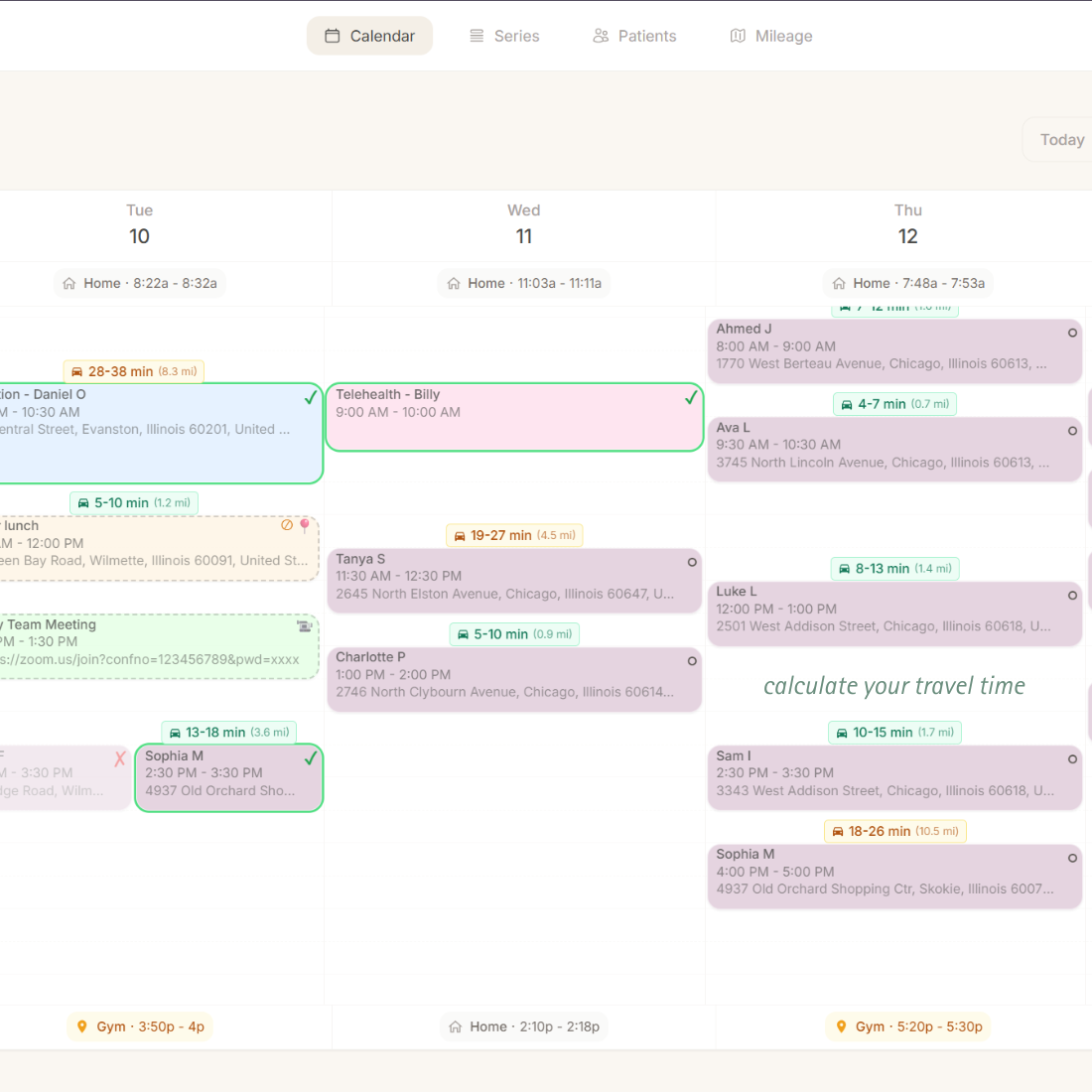
Your workday isn't just the time spent with patients. It's the driving. The transitions. The time it takes to wrap up, get moving, and arrive ready for the next visit. Tenyla Schedule shows real travel time between home visits directly on your calendar, so you know when to leave, how tight your day is, and what a change will actually do to the rest of your schedule—before you commit.
Confidence Comes From Knowing When to Leave
Most calendars assume appointments exist in isolation. Therapists know better.
When travel time is invisible, you're forced to do mental math all day:
Can I fit this makeup in?
If I move this visit, will I still make it home on time?
Am I going to be rushing again?
That uncertainty creates stress—even when everything technically "fits."
I'm often hesitant to try and squeeze in appointments when I have a timeblock because I can only make a best guess on whether I will have enough time between sessions to make it. This has often led to long gaps in my schedule because I didn't want to risk it.
RRachelEarly Intervention OT · Founding user
Know When to Leave, Every Time
Travel time isn't an afterthought.
Real Driving Routes
Time ranges based on actual road networks. See 17–22 minutes instead of a single estimate.
Visual Travel Blocks
Faded blocks between appointments show travel time. Know when to wrap up at a glance.
Tight Schedule Warnings
Alerts when appointments are too close. Adjust before committing, not when you're late.
Home Departure & Arrival
See travel from home to first visit and last visit back home. Know when your day really starts and ends.
Mid-Day Location Override
Add lunch breaks or errands as meetings. Travel adjusts automatically but stays out of mileage reports.
Instant Recalculation
Drag appointments to new times and watch travel blocks update. See the impact before you save.
Plan Your Week with Confidence
See travel time as you build your schedule
Add Appointments with Addresses
Enter patient addresses once. The system prepares routing automatically.
Travel Time Range Appears Automatically
Between visits, travel blocks show a realistic time range based on actual driving routes.
Adjust Before You Commit
If a day looks too tight, move things while planning. Build a week that flows instead of one you have to constantly manage.
Why Guesswork Breaks Down
Mental math vs. Tenyla Schedule
Mental Math
Tenyla Schedule
Accuracy
"It should be about 10 minutes"
Actual route: 18 minutes, calculated
Visibility
Held in your head
Visible blocks on calendar
Planning
Find out you're late when you're already late
See tight schedules before you commit
Schedule Changes
Recalculate in your head each time
Instant recalculation on drag-and-drop
Experience
Constant second-guessing
Confidence in your plan
Frequently Asked Questions
How accurate are the travel time estimates?
The system provides a travel time range based on average GPS travel data from real road networks, not straight-line distance. This range gives you cushion for traffic variations and potential route changes from road closures. For example, you might see "15–20 minutes" instead of a single number. This helps you build realistic schedules with buffer time built in.
Does this use live traffic data?
Travel times are based on average GPS travel data and typical driving conditions, not real-time traffic. However, the system provides a realistic time range to account for variations in traffic and potential road closures. This keeps the system fast and reliable for planning ahead while still giving you realistic buffer time.
What if I need to go home mid-day for lunch?
You can schedule a series or one-off "meeting" with an address during your lunch time. This travel will adjust your schedule calculations but be excluded from mileage reports. This handles lunch breaks, errands, or other mid-day stops.
Can I see travel time from home to my first appointment?
Yes. Set your home address in settings, and the system calculates travel from home to your first appointment of the day, and from your last appointment back home. If you will be at a different address before or after your shift, that can be adjusted for the day to update travel calculations.
What happens if I move an appointment on my calendar?
Travel times recalculate instantly. Drag an appointment to a new time slot, and the travel blocks update in real-time. You can see if the new schedule works before you commit to it.