Monday's Plan Never Survives Tuesday. This Planner Does.
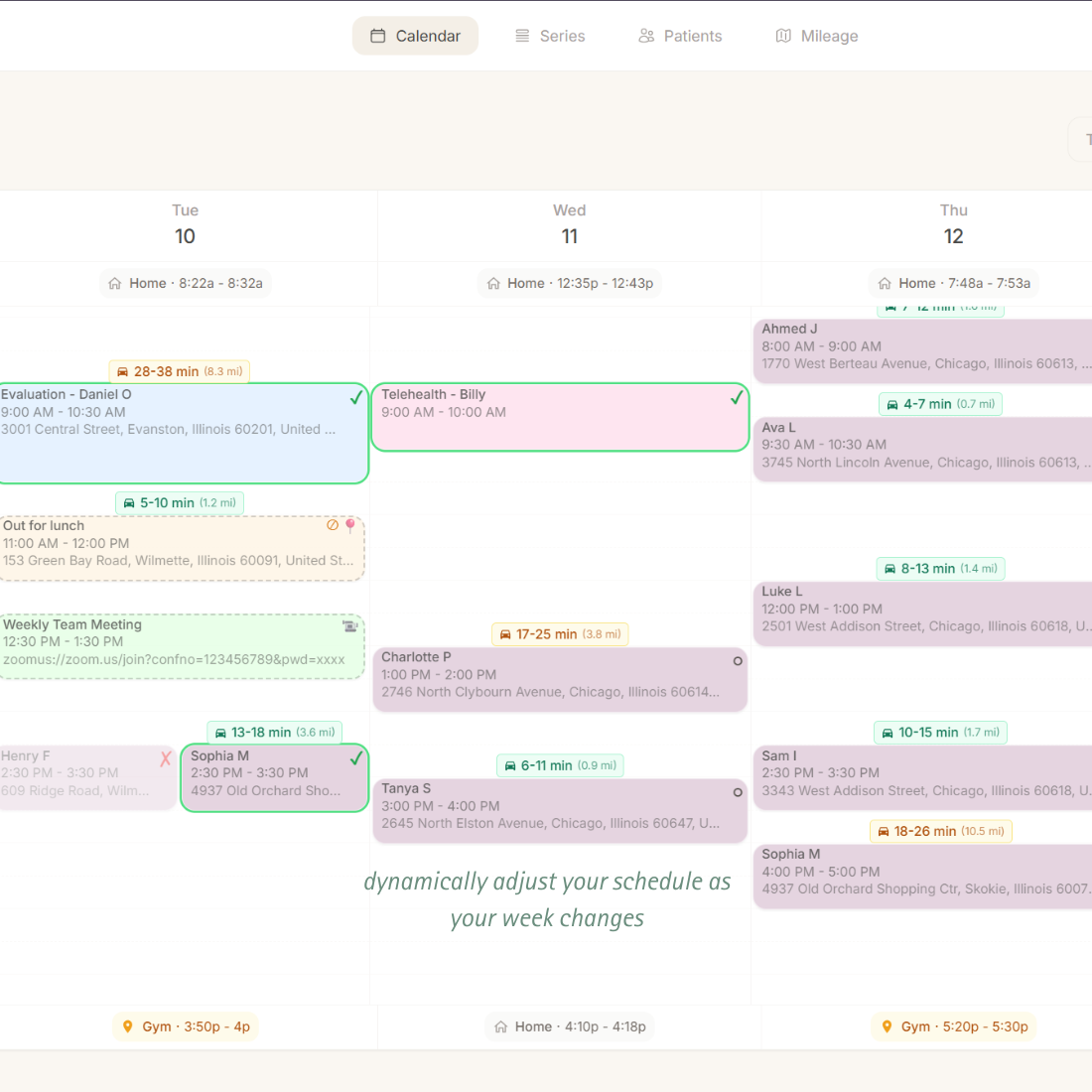
A weekly planner built for therapists—fast enough that you'll actually use it. Updates in seconds, shows travel time between visits, and doesn't lag behind your reality like EMR calendar integrations.
Why Therapists Use Paper Planners
And why this site looks like a notebook
Billing software calendars are slow: Changes lag, syncing is unreliable, updates take multiple clicks
Can't keep up with reality: 8–12 changes per week. Clunky calendars get abandoned by Tuesday
No travel time visibility: Most calendars only show appointment blocks—not the driving between them
The result? Most therapists keep a paper planner.
Fast to update. Works offline. Shows the whole day at a glance. But can't calculate travel time or show your real schedule including drive time.
My calendar has always been integrated with my company's billing or practice management system, so they're really inflexible. By the middle of the week, I'm usually just ignoring the calendar and keeping track of changes in my head. Then I would copy it over at the end of the week when I can find time.
RRachelEarly Intervention OT · Founding user
A Calendar That Keeps Up
Update it in seconds. See your whole day. Actually use it.
Recurring Series
Set "Sarah, Tuesdays at 10" once. Your weekly schedule builds itself.
Per-Visit Overrides
Change one visit without breaking the pattern. Tuesday at 2pm instead? Just override that one.
Drag-and-Drop
Move appointments on your weekly calendar. No forms, no retyping.
Track Plan vs. Reality
Mark visits verified, cancelled, or rescheduled. See what actually happened.
Color-Coded Series
Assign colors to each series. See visit types at a glance.
Solo or Team-Friendly
Manage your own schedule daily. Admins can switch between clinicians for oversight without forcing centralized control.
Updates That Don't Lag Behind Reality
Change appointments instantly. Your calendar stays current.
Create Recurring Series
Set "Sarah, every Tuesday 10am–11am" with default address, phone, and color. Your baseline repeats weekly.
Override When Needed
Change one visit's time or location. The series stays intact for next week.
Next Week Loads Clean
Overrides don't carry forward. Start fresh with the plan, not the chaos.
Why EMR Calendars Get Abandoned
Clunky integrations vs. Tenyla Schedule
EMR Calendar Integrations
Tenyla Schedule
Update Speed
Slow sync, multiple clicks, lag behind changes
Instant updates, drag-and-drop
Daily Changes
Too clunky—abandoned by Tuesday
Fast enough to keep current
Travel Time
Just appointment blocks
Shows driving between visits
Full Day
Appointments only
Appointments + travel + gaps
Result
Abandoned mid-week, corrected at week's end
Keeps up with you—becomes the system of record
Frequently Asked Questions
Is this a home health scheduling app or a calendar?
It's a scheduling tool built specifically for recurring home visits—more flexible than rigid calendar recurrence rules, and designed to keep next week clean.
Can an admin manage multiple clinicians?
Yes. An admin account can switch between clinician schedules for oversight and coordination, while clinicians can still manage their own day-to-day changes.
What's the difference between a series and an appointment?
A series is your recurring template: "Sarah, every Tuesday at 10am." An appointment is the actual visit on your calendar. Each week, appointments are created from your series defaults. If you need to change just one visit (this Tuesday Sarah is at 2pm instead), you override that specific appointment. The series stays unchanged for next week.
What if a patient permanently changes their time?
Update the series default. All future appointments will use the new time. Past appointments and this week's appointments stay as they are (unless you manually update them).
Can I have different patients on different weeks?
Yes. You can set series cadence to weekly, bi-weekly, monthly, or custom. So if you see Sarah every other Tuesday, set her series to bi-weekly. Only the applicable weeks get appointments.
How does drag-and-drop work with series?
When you drag an appointment to a new time, it becomes an override for that visit. The series default doesn't change. So next week, the appointment goes back to the original series time unless you update the series itself.
What happens to cancelled appointments?
When you cancel an appointment, it's marked as cancelled but stays on your calendar (grayed out). This helps you remember what happened. It won't affect mileage calculations or SMS sends. Next week, the series creates a fresh appointment for that time slot as usual.